Thursday, April 26, 2007

Tables from Office 2007 to BlogSpot – Part II

Back to result from my previous post here, I'm disappointed from the results I get (Yeah, all of them). My first curious is because the table width are simply not dynamic. Let's try this again.

Table 1: Dynamic table with layout and auto fit content turned on

Code

Using lgb As
New LinearGradientBrush(Me.ClientRectangle, Color.Red, Color.Blue, LinearGradientMode.Horizontal)

e.Graphics.FillRectangle(lgb, Me.ClientRectangle)

End
Using


Table 2: Dynamic table with layout and auto fit to window turned on

Code

Using lgb As
New LinearGradientBrush(Me.ClientRectangle, Color.Red, Color.Blue, LinearGradientMode.Horizontal)

e.Graphics.FillRectangle(lgb, Me.ClientRectangle)

End
Using


Table 3: Dynamic table with layout and column width set to 100%

Code

Using lgb As
New LinearGradientBrush(Me.ClientRectangle, Color.Red, Color.Blue, LinearGradientMode.Horizontal)

e.Graphics.FillRectangle(lgb, Me.ClientRectangle)

End
Using


Okay, let's see the result now.

Tables from Office 2007 to BlogSpot

Since I'll use table a lot for posting a code, I'll do some test with this post. Here it goes.

Table 1: Default Table

Code

Using lgb As
New LinearGradientBrush(Me.ClientRectangle, Color.Red, Color.Blue, LinearGradientMode.Horizontal)

e.Graphics.FillRectangle(lgb, Me.ClientRectangle)

End
Using


Table 2: Table with layout (Font Bold by default)

Code

Using lgb As
New LinearGradientBrush(Me.ClientRectangle, Color.Red, Color.Blue, LinearGradientMode.Horizontal)

e.Graphics.FillRectangle(lgb, Me.ClientRectangle)

End
Using


Table 3: Table with layout (Font changed back to normal)

Code

Using lgb As
New LinearGradientBrush(Me.ClientRectangle, Color.Red, Color.Blue, LinearGradientMode.Horizontal)

e.Graphics.FillRectangle(lgb, Me.ClientRectangle)

End
Using


Table 4: Table with layout (Font changed to normal and same font)

Code

Using lgb As
New LinearGradientBrush(Me.ClientRectangle, Color.Red, Color.Blue, LinearGradientMode.Horizontal)

e.Graphics.FillRectangle(lgb, Me.ClientRectangle)

End
Using


Table 5: Table with layout (Font changed to normal and same font and same size)

Code

Using lgb As
New LinearGradientBrush(Me.ClientRectangle, Color.Red, Color.Blue, LinearGradientMode.Horizontal)

e.Graphics.FillRectangle(lgb, Me.ClientRectangle)

End
Using


Ok. Lets see the result for now

Difficult formatting between Office 2007 and Blogspot

For strange reason, I have difficulty posting my blog with Office 2007 especially when I posting blog with a source code. I used my defined table and color for visual basic code. Every time I posted some codes; it always messed up, the formatting and text size. It might have something to do with office 2007 itself. Maybe I should post some test article and find another reference in the net.

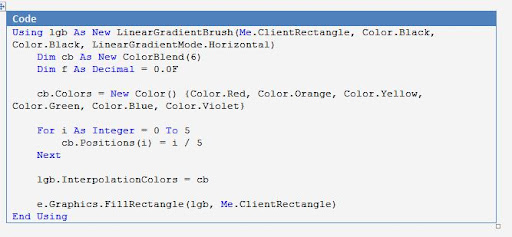
Let's try a little test here and see what I see in my blog:

Code

Using lgb As
New LinearGradientBrush(Me.ClientRectangle, Color.Black, Color.Black, LinearGradientMode.Horizontal)


Dim cb As
New ColorBlend(6)


Dim f As
Decimal = 0.0F


cb.Colors = New Color() {Color.Red, Color.Orange, Color.Yellow, Color.Green, Color.Blue, Color.Violet}


For i As
Integer = 0 To 5

cb.Positions(i) = i / 5


Next


lgb.InterpolationColors = cb


e.Graphics.FillRectangle(lgb, Me.ClientRectangle)

End
Using


My reason to post a blog from Office 2007 because it has built in spell checker and you can build table and copy source with exact format from original (indention, colors, etc). So, I have no choice than stick with this method and find any useful trick to solve my problems.

Now, lets compare it with my original word document:

Wednesday, April 25, 2007

Code Project Article

At least. My first article on Code Project has online. It took about 3 days since I send it. But it's not a big deal. I'd like to see how's my article rating within this month. After 1 year learning VB 2005, I've create many custom control. They only use for my personal purpose only. After I see several websites sold their control / components, I'm start to commercialize my work either. Maybe I should start to make my own component provider?

If you want to see what article that I've write, see here. Since you see it, don't forget to rate :P

Monday, April 23, 2007

VB Corner Tutorial Site

I've created a Visual Basic 2005 tutorial site. Check it here. With this site, I hope someone can find improvement with their skills in VB.

Enjoy.

Wednesday, March 21, 2007

26 Years old

Yesterday was my birthday. So, I'm 26 years old right now. Times sure goes fast. Yesterday seem like a school days, and now I'm in working field. There's still soo much to be done, including building my own carrer (or should I say, "my empire" heh..heh..). With so many goals in my future, I must take immediate action. At first, I'll try hard to finish my master degree, so I can do anything from there...

Tuesday, March 20, 2007

An Analog Clock Component

During these days, I've attended some programming challenge in a forum. It's quite fun because that can horne my skills and of course show some showoff hehe ;D. It's also a great task to spend my weekend (because I'm still single and nothing to do. If I have a girlfriend, things will be different :D ).

TheClock, is my latest component that mimic clock sidebar on Vista. For now, it's still have one style (modern). At this time, it only has a standard features, but I've reserved some functions for future. Also I've engineered the class so I can insert a new feature easily in the future (If I have time of course te..he..).

Here's some screen shot:
http://www.geocities.com/mick_rawi/2.jpg
http://www.geocities.com/mick_rawi/3.jpg

You can download the code at: http://www.geocities.com/mick_rawi/TheClock.zip

That's for now. Sorry for lack documentation and explaination about this component, because I'm still not good in those two. But I'm learning for it okay ? Of course I know that presentation ability is one of most important things to make customer in the future.

Actually, I've created many more good stuff (at least for me), that I want to share with everyone. But, right now, I'm don't have enough time to do that. For meanwhile, enjoy "TheClock" :D